Showing posts with label Threading. Show all posts

Jul 14, 2015

Multithreading in C#

Multithreading
 
Multithreading is used to perform multiple tasks at the same time. Tasks with the potential of holding up other tasks can execute on separate threads, a process known as multithreading. Or, it's basically trying to do more than one thing at a time within a process.
 

Namespace

 
In .NET, threading functionality is defined in the System.Threading namespace. So you have to define System.Threading namespace before using any thread classes.
 
using System.Threading;
 

Starting a Thread

 
A C# client program starts in a single thread created automatically by the CLR and operating system that is called the main thread, and is made multithreaded by creating additional threads. Here's a simple example and its output.
 
using System;
using System.Collections.Generic;
using System.Linq;
using System.Text;
using System.Threading;
 
namespace multi
{
    class Program
    {
        static void Main(string[] args)
        {
            Thread th = new Thread(WriteY);
            th.Start();
            for (int i = 0; i <= 10; i++)
            {
                Console.WriteLine("Hello");
            }
        }
        private static void WriteY()
        {
            for (int i = 0; i <= 9; i++)
            {
                Console.Write("world");
            }
        }
 
    }
}

OUTPUT

In the above example, the main thread creates a new thread on which it runs a method that repeatedly prints the string "world". Simultaneously, the main thread repeatedly prints the string "Hello".
 

Abort a Thread

 
The Thread class's Abort method is called to abort a thread. Make sure you check the IsAlive property before Abort.
 
if (Thread.IsAlive)
{
    Thread.Abort();
}
 
Here's a simple example and its output.
 
using System;
using System.Collections.Generic;
using System.Linq;
using System.Text;
using System.Threading;
 
namespace multi
{
    class Program
    {
        static void Main(string[] args)
        {
            Thread th = new Thread(WriteY);
            if (th.IsAlive)
            {
                th.Start();
                th.Abort();
            }
 
            for (int i = 0; i <= 10; i++)
            {
                Console.WriteLine("Hello");
            }
        }
        private static void WriteY()
        {
            for (int i = 0; i <= 9; i++)
            {
                Console.WriteLine("world");
            }
 
        }
    }
 
}
 
OUTPUT


In the above example, The main thread creates a new thread which is stopped by the abort method. The main thread repeatedly prints the string "Hello".


Pausing a Thread

The Thread.Sleep method can be used to pause a thread for a fixed period of time.

Thread.Sleep() 
Here's a simple example and its output.
 
using System;
using System.Collections.Generic;
using System.Linq;
using System.Text;
using System.Threading;
 
namespace multi
{
    class Program
    {
        static void Main(string[] args)
        {
            Thread th = new Thread(WriteY);
            th.Start();
            for (int i = 0; i <= 10; i++)
            {
                Console.WriteLine("Hello");
                Thread.Sleep(1000);
            }
        }
 
        private static void WriteY()
        {
            for (int i = 0; i <= 9; i++)
            {
                Console.WriteLine("world");
                Thread.Sleep(500);
            }
 
        }
 
    }
 
}
 
OUTPUT


 In the above example, the main thread creates a new thread which is paused by the Sleep method for 500 milliseconds. The main thread is also paused by a Sleep method for 1000 milliseconds.
 

Thread Priority

 
The Thread class's ThreadPriority property is used to set the thread's priority. The thread priority can have Normal, AboveNormal, BelowNormal, Highest, and Lowest values.
 
thread.Priority = ThreadPriority.Lowest
Here's a simple example without priority and its output.
 
using System;
using System.Collections.Generic;
using System.Linq;
using System.Text;
using System.Threading;
 
namespace multi
{
    class Program
    {
        static void Main(string[] args)
        {
            Thread th = new Thread(WriteY);
            th.Start();
            for (int i = 0; i <= 10; i++)
            {
                Console.WriteLine("Hello");
            }
        }
 
        private static void WriteY()
        {
            for (int i = 0; i <= 9; i++)
            {
                Console.WriteLine("world");
            }
        }
    }
}
 
OUTPUT


Using With Lowest Priority

 
using System;
using System.Collections.Generic;
using System.Linq;
using System.Text;
using System.Threading;
 
namespace multi
{
    class Program
    {
        static void Main(string[] args)
        {
            Thread th = new Thread(WriteY);
            th.Priority = ThreadPriority.Lowest;
            th.Start();
            for (int i = 0; i <= 10; i++)
            {
                Console.WriteLine("Hello");
            }
        }
 
        private static void WriteY()
        {
            for (int i = 0; i <= 9; i++)
            {
                Console.WriteLine("world");
            }
        }
    }
}
 
OUTPUT
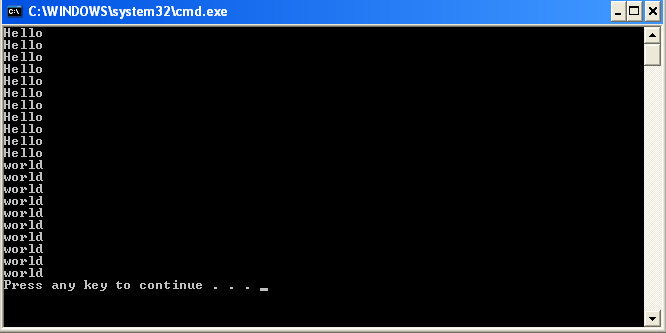


In the above example defines the priority, the without priority example executes the method writeY() but in the second example we defined the lowest priority it will execute main method first. 
 

Suspend a Thread

 
The Suspend method of the Thread class suspends a thread. The thread is suspended until the Resume method is called.
 
if (thread.ThreadState == ThreadState.Running)
{
       thread.Suspend();
}
 
Resume a suspended Thread
The Resume method is called to resume a suspended thread. If the thread is not suspended, the Resume method will have no effect.
 
if (thread.ThreadState == ThreadState.Suspended) {
       thread.Resume();
}


Aug 22, 2011

A Simple Thread example in Visual C#.Net 2005

This article explains how to use the thread and how to display the time in visual studio c#.net 2005.


What is thread? 

Threading means to handle some method repeatedly without interrupting other processes. I will explain a thread with a simple example. Consider that, we are going to display the digital clock with the date in the Form.
To do the thread we need the ‘Threading’ namespaces,
Import it as,


using System.Threading;
and also, we have to create 2 buttons for start the thread and stop the thread. One label for display the current date and time.

To initialise the thread, create a Thread object under the class as a global like this,


Thread th;


On the first button click event write down the following code,


th = new Thread(new ThreadStart(disp));
th.IsBackground = true;
th.Start();
[/cod]

This means, to start a ‘disp’ method we initialise the Threadstart object.
‘th.IsBackground = true’ means the thread run in the background. That means, the systems takes it as the task was finished. 
To invoke the thread use, ‘th.Start()’ method.

Then we have to ‘disp()’ method, which is the repeated task.


void disp()
{
            while (true)
            {
                label1.Text = DateTime.Now().ToString();
                Thread.Sleep(1000);
            }
}


The Above method will fine work in Visual C# 2002. but in 2005 it will not work. Because, in 2002 version the C# will accept the unsafe thread. But 2005 will accept the safe thread only. 
So we are going to rewrite the above code as,


Here we have to Invoke the lebel1. To do this we have to use delegate concept. So add the delegate as global.


private delegate void TickerDelegate(string s);
TickerDelegate tickerDelegate1;
In the constructor instantiate the delagate as


tickerDelegate1 = new TickerDelegate(SetLeftTicker);

SetLeftTicker’ is a method passed as a argument to the delegate.
So again we have to define that method.

private void SetLeftTicker(string s)
{
  label1.Text = s ;
}


Hereafter the clock will run repeatedly in the 1000 milliseconds gap.

To pause the clock, use the next button. On the button click event, write the code as,


If(th.IsAlive)
{
th.Suspend();
}


Here I am giving you the detailed Code as,


#region Using directives

using System;
using System.Collections.Generic;
using System.ComponentModel;
using System.Data;
using System.Drawing;
using System.Windows.Forms;
using System.Threading;

#endregion

namespace Clock
{
    partial class Form1 : Form
    {
        Thread th1;
        private delegate void TickerDelegate(string s);
        TickerDelegate tickerDelegate1;
        public Form1()
        {
            InitializeComponent();
            tickerDelegate1 = new TickerDelegate(SetLeftTicker);
            
        }

        public void button1_Click(object sender, EventArgs e)
        {
            
            th1 = new Thread(new ThreadStart(disp));
            th1.IsBackground = true;
            th1.Start();
        }

        private void SetLeftTicker(string s)
        {
            label1.Text = s ;
        }

        void disp()
        {
            while (true)
            {
                label1.Invoke(tickerDelegate1, new object[] { DateTime.Now.ToString() });
                Thread.Sleep(1000);
            }
        }

        private void button2_Click(object sender, EventArgs e)
        {
            if (th1.IsAlive)
            {
                th1.Suspend();
            }
        }

       
    }
}